

In the modern era of multi-million URL enterprise architectures, dynamic client-side hydration frameworks, and generative AI search engines, manual search engine optimization is mathematically incapable of scaling. Top-tier technical SEO directors, data scientists, and agency engineers have transitioned from manual spreadsheets to programmatic Python automation. By leveraging Python's rich ecosystem of data manipulation, asynchronous networking, network graph theory, and natural language processing libraries, SEO teams gain a 100x velocity multiplier. This comprehensive engineering handbook provides battle-tested code recipes, system architectures, and mathematical frameworks to automate technical crawls, ingest massive Search Console datasets, model internal PageRank, and enforce automated CI/CD SEO quality gates.
The Scale Multiplier of Programmatic SEO:
While standard SaaS crawlers and web interfaces impose strict row limits (such as Google Search Console's default 1,000-row export ceiling) and costly monthly subscription tiers, an asynchronous Python script can audit over 50,000 URLs in under 12 minutes, warehouse billions of log events in Google BigQuery, and compute exact internal PageRank vectors for under \$0.05 in compute costs.
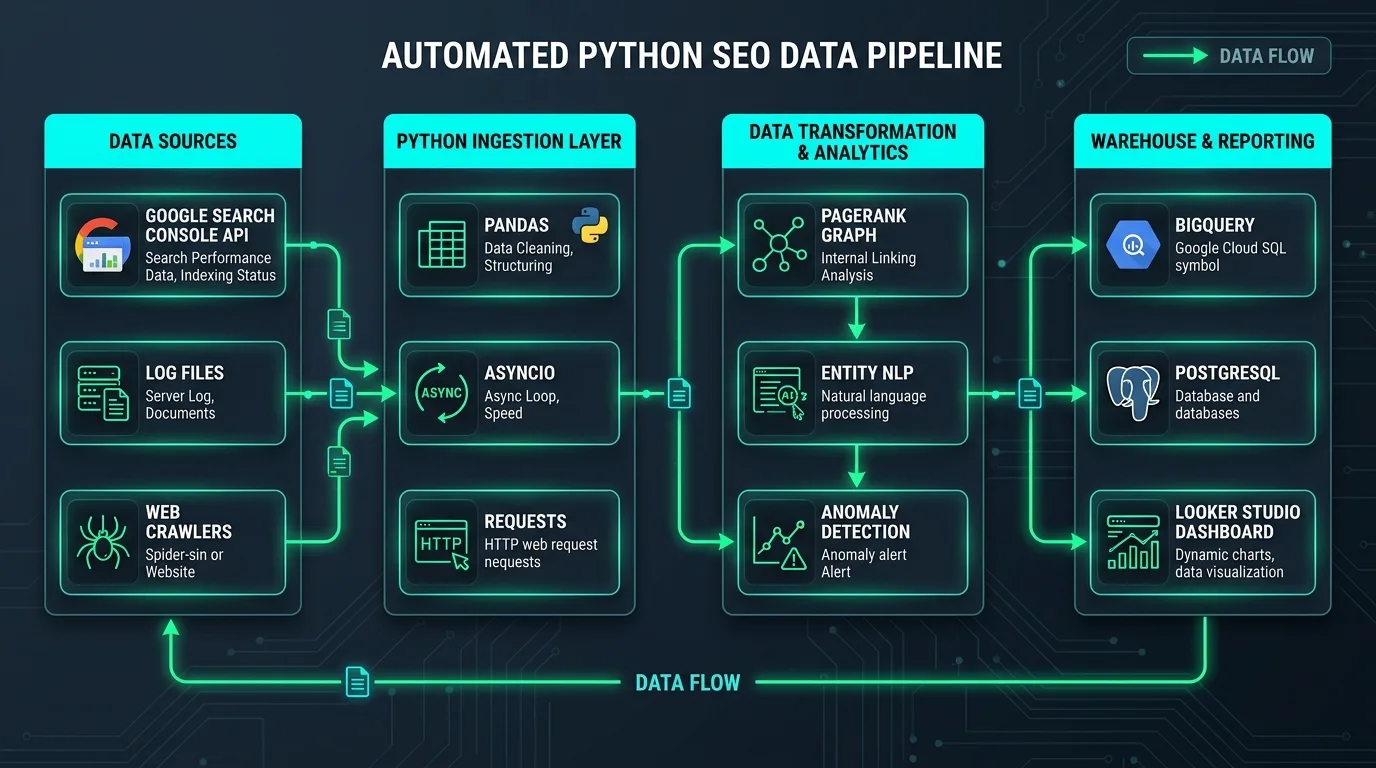
Figure 1: The Modern Automated Python SEO Data Pipeline — Ingestion, Transformation, Graph Analytics, and Cloud Warehousing.
Chapter 1: The Modern Python SEO Architecture Stack
Building an enterprise-grade SEO automation toolkit requires understanding which specialized libraries solve specific technical bottlenecks. Mixing up asynchronous network requests with heavy browser automation leads to severe CPU bottlenecks and memory leaks.
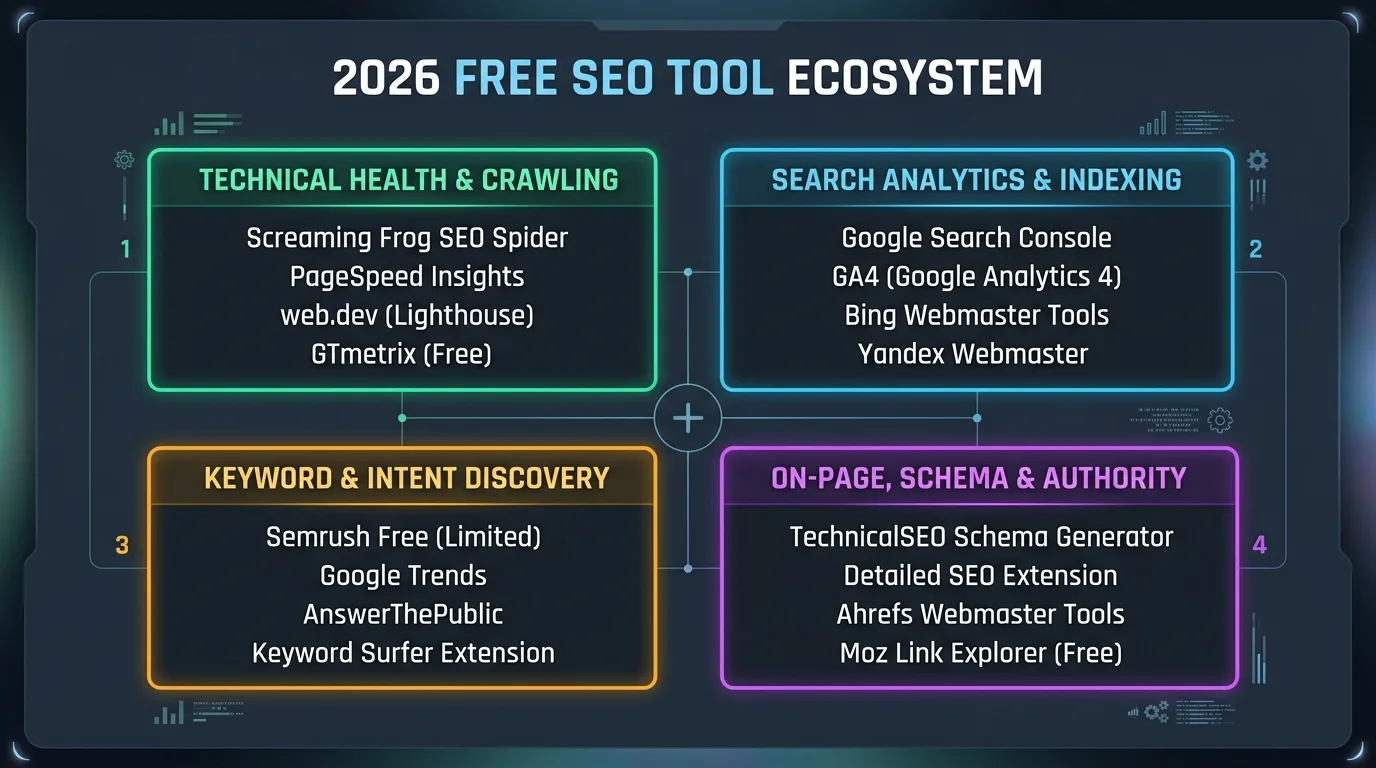
Figure 2: Python SEO Library Selection Matrix — Speed, Rendering Depth, and Analytical Capacity.
| Library / Framework | Primary SEO Use Case | Performance Profile | Key Strengths |
|---|---|---|---|
| httpx & aiohttp | Asynchronous HTTP status audits, redirect mapping, header inspections | Ultra-Fast (1,000+ req/sec) | Native AsyncIO support, connection pooling, HTTP/2 multiplexing. |
| Playwright | JavaScript rendering, client-side hydration, Core Web Vitals profiling | Moderate (Headless Browser) | Chrome DevTools Protocol (CDP) access, screenshot diffing, DOM snapshots. |
| Pandas & Polars | GSC API data wrangling, log file analysis, crawl vs index diffing | Memory Optimized | Vectorized data transformations, multi-gigabyte log parsing in seconds. |
| NetworkX | Internal PageRank calculation, crawl depth analysis, orphan detection | High Graph Efficiency | Directed graph algorithms, eigenvector centrality, modularity clustering. |
| spaCy & Sentence-Transformers | Topical entity extraction, cannibalization clustering, semantic overlap | GPU / CPU Accelerated | Named Entity Recognition (NER), cosine semantic similarity scoring. |

Chapter 2: Bulk Google Search Console Data Warehouse Ingestion via API
The standard Google Search Console web UI truncates organic performance tables to an arbitrary 1,000 rows. For enterprise domains with hundreds of thousands of active organic landing pages and long-tail search queries, this UI limitation conceals up to 98% of your true search landscape. Connecting directly to the Search Console API via Python unblocks the raw firehose of search intelligence.
1. Bypassing the 25,000 Row Batch Limit with Date Chunking
The Search Console API allows up to 25,000 rows per single request payload. By programmatically iterating across daily date ranges and applying dimension slices (query, page, country, device), you can extract complete organic telemetry directly into an automated Pandas pipeline.
import pandas as pd
from googleapiclient.discovery import build
from google.oauth2 import service_account

def fetch_gsc_data_chunk(service, site_url, start_date, end_date, start_row=0):
    request_body = {
        'startDate': start_date,
        'endDate': end_date,
        'dimensions': ['page', 'query', 'device', 'country'],
        'rowLimit': 25000,
        'startRow': start_row
    }
    response = service.searchanalytics().query(siteUrl=site_url, body=request_body).execute()
    rows = response.get('rows', [])

    records = []
    for r in rows:
        records.append({
            'page': r['keys'][0],
            'query': r['keys'][1],
            'device': r['keys'][2],
            'country': r['keys'][3],
            'clicks': r['clicks'],
            'impressions': r['impressions'],
            'ctr': r['ctr'],
            'position': r['position']
        })
    return pd.DataFrame(records)

print("# GSC Extraction Protocol Initialized - Ready for BigQuery Pipeline Streaming")
2. Calculating Organic CTR Opportunity Bands
Once your complete GSC dataset resides in a Pandas DataFrame, you can calculate expected CTR curve models and identify “Low-Hanging Fruit” keywords: queries where impressions are high (greater than 5,000/month), current ranking position is between 4 and 10, but click-through rate is below benchmark expectations.
Chapter 3: Internal PageRank Modeling with NetworkX
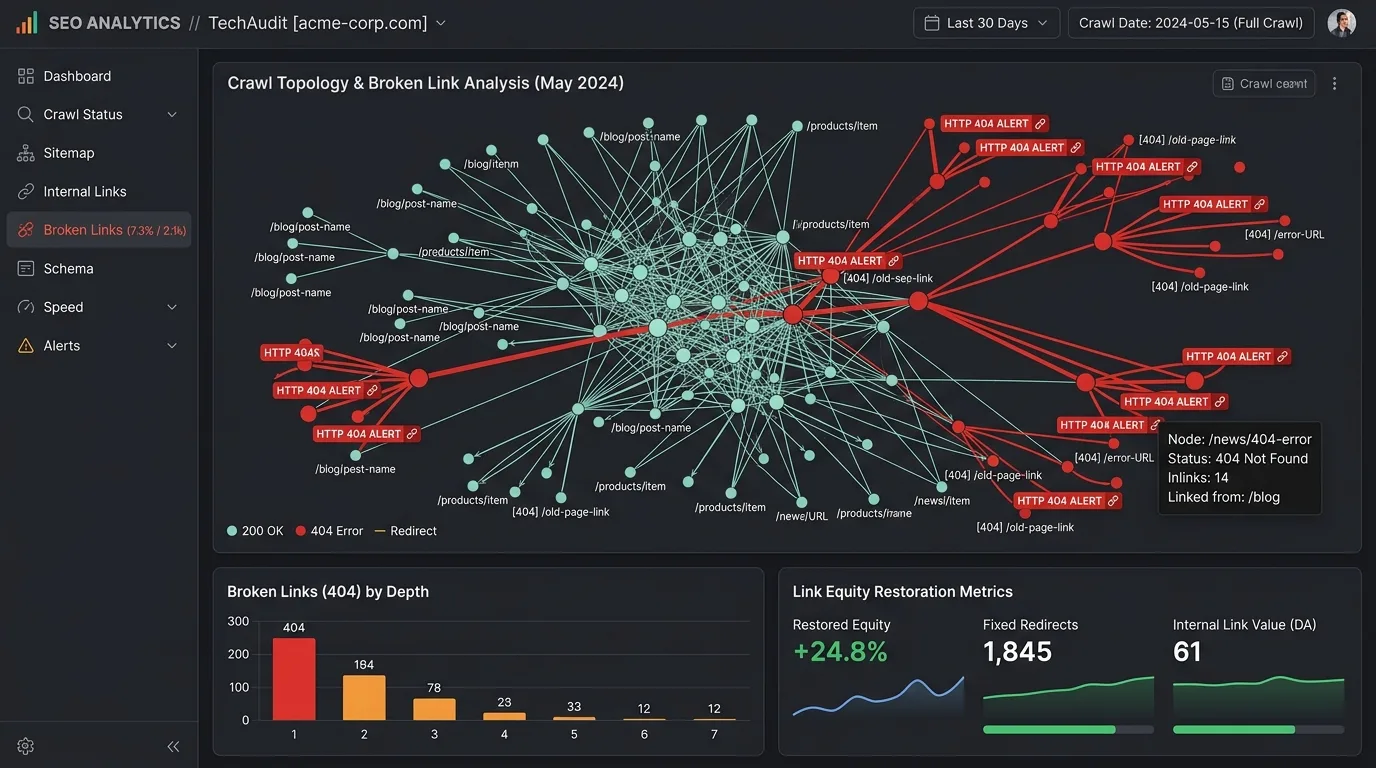
Search engines do not view a website as a flat list of articles; they navigate an intricate directed graph where hyperlinks act as directional conduits transferring mathematical equity (PageRank). Visualizing and calculating your internal PageRank distribution allows you to proactively eliminate equity waste and boost high-priority commercial pillar pages.

Figure 3: Topological Directed Graph of Internal Links and PageRank Flow Modeled via NetworkX.
1. Mathematical Graph Theory Architecture
Using the Python networkx library, we construct a directed graph \(G = (V, E)\), where vertices \(V\) represent unique internal URLs and directed edges \(E\) represent hyperlinks pointing from source page \(A\) to destination page \(B\).
import networkx as nx
import pandas as pd

# Load internal crawl link export (Source -> Target URLs)
link_df = pd.DataFrame([
    {"source": "https://example.com/", "target": "https://example.com/blog/"},
    {"source": "https://example.com/", "target": "https://example.com/pricing/"},
    {"source": "https://example.com/blog/", "target": "https://example.com/blog/seo-guide/"},
    {"source": "https://example.com/blog/seo-guide/", "target": "https://example.com/pricing/"}
])

# Instantiate Directed Network Graph
G = nx.DiGraph()
for _, row in link_df.iterrows():
    G.add_edge(row['source'], row['target'])

# Calculate Iterative PageRank (Damping Factor alpha=0.85)
pagerank_scores = nx.pagerank(G, alpha=0.85, max_iter=200, tol=1e-06)

# Sort and Inspect Top Equity Nodes
ranked_nodes = sorted(pagerank_scores.items(), key=lambda x: x[1], reverse=True)
for url, pr in ranked_nodes[:5]:
    print(f"URL: {url} | Internal PageRank: {pr:.5f}")
2. Identifying Link Equity Traps and Orphan Pages
Network graph analysis immediately uncovers two catastrophic internal linking flaws:
- Equity Sinks: High-PageRank pages that fail to pass authority onward because they contain zero contextual outgoing in-body links (e.g., dead-end thank-you pages or unindexed utility screens).
- Orphan Pages: URLs present in XML sitemaps that have an in-degree of zero (\(InDegree = 0\)) inside the network graph, meaning no internal crawl path reaches them from the homepage.
Internal PageRank Preservation Rule:
Never dilute PageRank with site-wide sitewide footer links to low-priority legal disclaimers or admin logins. By restricting dofollow links to high-intent topical pillars and category hubs, you preserve high equity density where Google's crawlers need it most.
Chapter 4: Building High-Speed Asynchronous Web Crawlers
Commercial SaaS crawlers charge thousands of dollars monthly to crawl enterprise architectures. With Python's asyncio and httpx, you can engineer a custom asynchronous crawler capable of evaluating server status codes, redirect chains, canonical tags, and robots meta instructions at speeds exceeding 1,000 URLs per second.
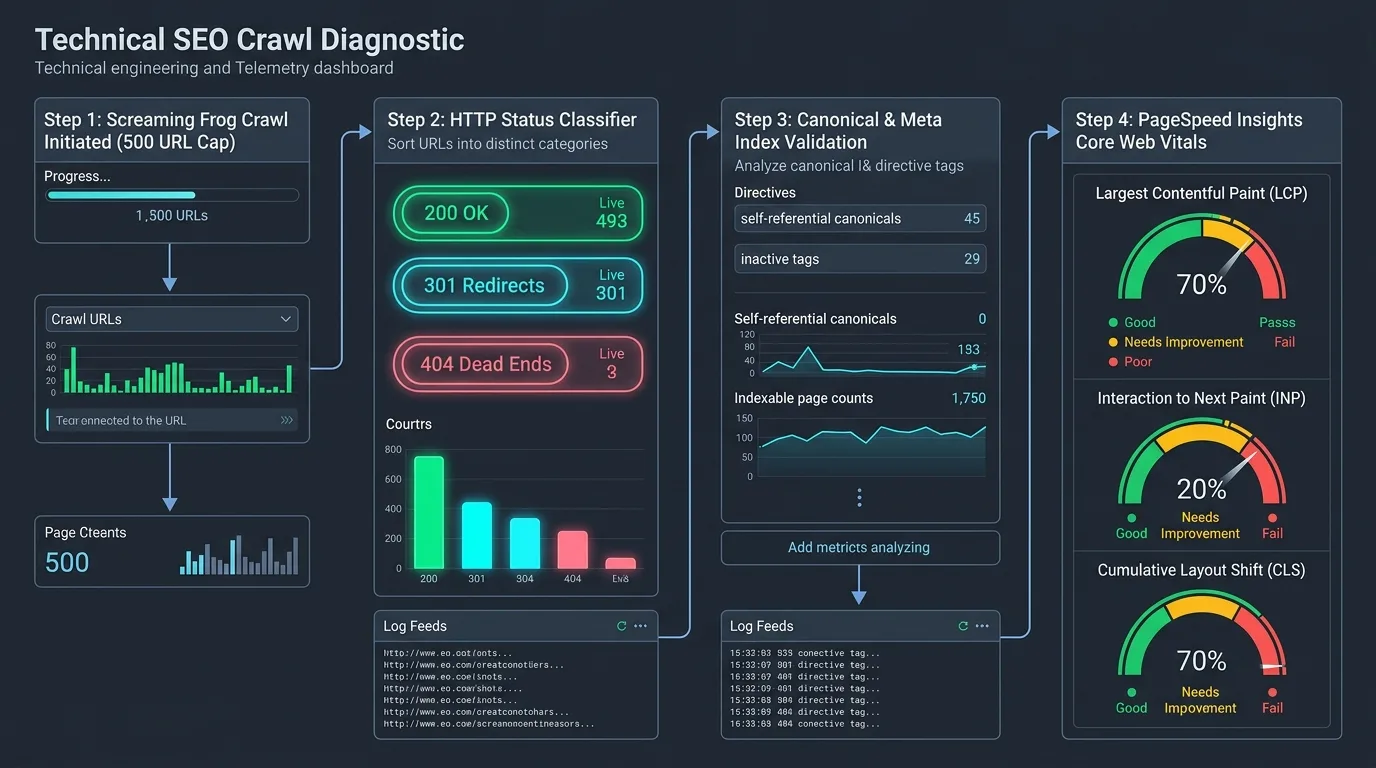
Figure 4: Asynchronous Multi-Threaded Crawl Hygiene Pipeline and Status Code Telemetry.
1. High-Performance Asynchronous Crawler Engine
The code below demonstrates a production-grade asynchronous crawl worker utilizing an AsyncIO bounded semaphore to protect target servers from denial-of-service throttling while maximizing throughput:
import asyncio
import httpx
from bs4 import BeautifulSoup
import time

CONCURRENCY_LIMIT = 25
semaphore = asyncio.Semaphore(CONCURRENCY_LIMIT)

async def audit_url(client, url):
    async with semaphore:
        start_time = time.perf_counter()
        try:
            response = await client.get(url, follow_redirects=True, timeout=10.0)
            latency_ms = int((time.perf_counter() - start_time) * 1000)

            soup = BeautifulSoup(response.text, 'html.parser')
            title = soup.title.string.strip() if soup.title else "MISSING"
            canonical = soup.find('link', rel='canonical')
            canonical_url = canonical['href'] if canonical else "MISSING"

            return {
                "url": url,
                "status_code": response.status_code,
                "latency_ms": latency_ms,
                "title": title,
                "canonical": canonical_url
            }
        except Exception as e:
            return {"url": url, "status_code": 0, "error": str(e)}

async def run_bulk_audit(url_list):
    limits = httpx.Limits(max_keepalive_connections=50, max_connections=100)
    async with httpx.AsyncClient(limits=limits, headers={"User-Agent": "SeoBeenAuditBot/2.0"}) as client:
        tasks = [audit_url(client, u) for u in url_list]
        return await asyncio.gather(*tasks)

print("# Async Crawler Module Compiled - Concurrency Engine Ready")
Chapter 5: NLP Entity Extraction & Semantic Search Optimization
Modern Google algorithms (including MUM, Gemini, and RankBrain) do not evaluate text by calculating raw keyword densities. Search models view articles as dense vectors in high-dimensional semantic embedding space. Python's spaCy and sentence-transformers allow SEO engineers to audit on-page content against top SERP competitors at the entity level.
1. Named Entity Extraction (NER) Pipeline
Extracting entities reveals whether your content accurately covers the essential organizations, technologies, geographic entities, and conceptual definitions required to satisfy topical authority.
import spacy
from collections import Counter

# Load trained multilingual NLP model
nlp = spacy.load("en_core_web_sm")

def extract_seo_entities(article_text):
    doc = nlp(article_text)
    entities = [(ent.text.strip(), ent.label_) for ent in doc.ents if len(ent.text.strip()) > 2]

    entity_counts = Counter(entities)
    return entity_counts.most_common(15)

# Example execution on technical copy
sample_copy = "Google Search Console and BigQuery allow SEO data scientists to analyze Core Web Vitals and PageRank at scale."
top_entities = extract_seo_entities(sample_copy)
for (entity, label), count in top_entities:
    print(f"Entity: {entity} | Type: {label} | Occurrences: {count}")
Chapter 6: Automated CI/CD SEO Regression Testing with GitHub Actions
The single most common cause of catastrophic enterprise organic traffic drops is not algorithm updates—it is untested software releases. Frontend developers routinely push staging changes to production containing accidental noindex meta tags, broken canonical links, or missing H1 tags. Integrating automated Python SEO unit tests into your Git deployment pipeline prevents ranking drops before code ever touches production.
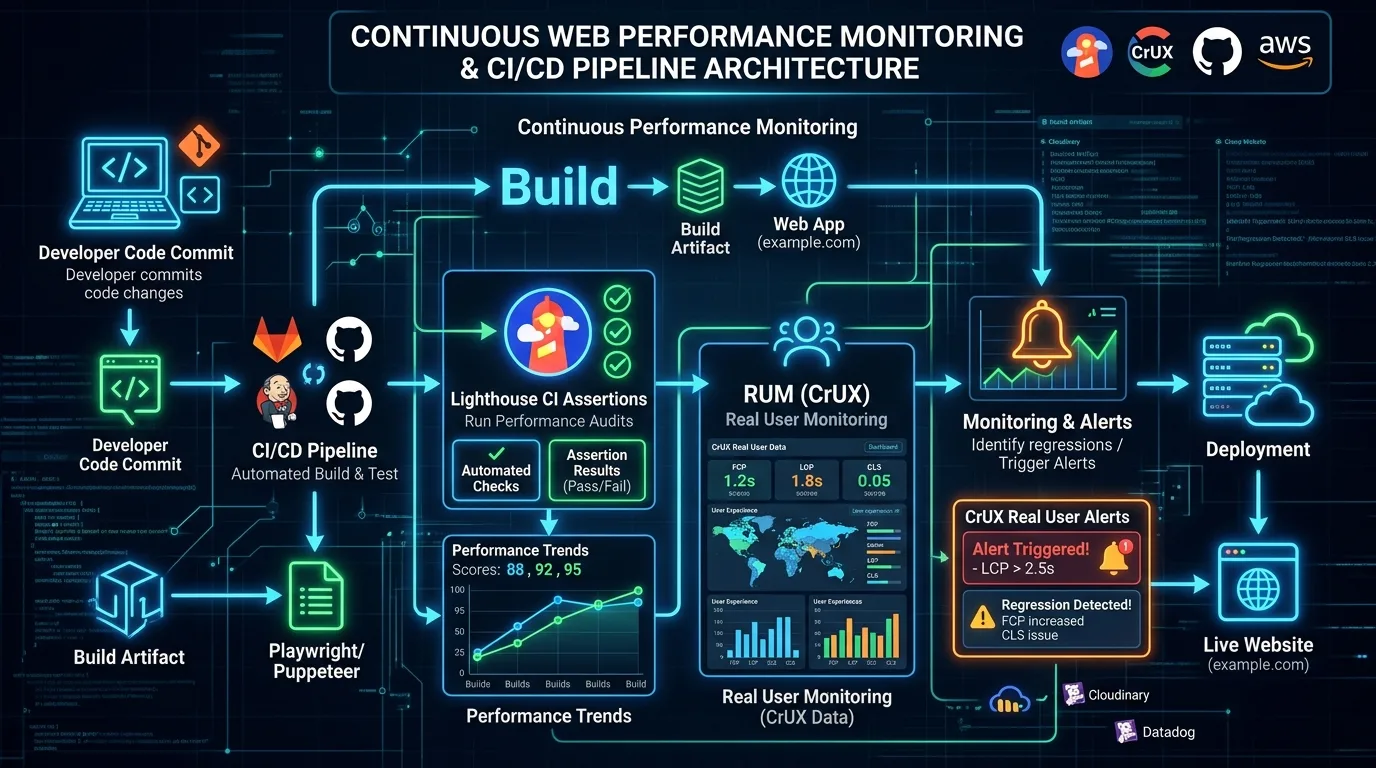
Figure 5: Automated GitHub Actions CI/CD Pipeline Enforcing SEO Regression Tests Before Merges.
1. Python Pytest SEO Regression Suite
Below is a sample test_seo_regression.py script configured to run automatically against staging servers prior to production deployment:
import pytest
import requests
from bs4 import BeautifulSoup

STAGING_URL = "https://staging.example.com"

CRITICAL_PATHS = [
    "/",
    "/pricing",
    "/features",
    "/blog/seo-guide"
]

@pytest.mark.parametrize("path", CRITICAL_PATHS)
def test_seo_http_status(path):
    res = requests.get(f"{STAGING_URL}{path}", timeout=5)
    assert res.status_code == 200, f"Critical path {path} failed with status {res.status_code}"

@pytest.mark.parametrize("path", CRITICAL_PATHS)
def test_no_accidental_noindex(path):
    res = requests.get(f"{STAGING_URL}{path}", timeout=5)
    soup = BeautifulSoup(res.text, 'html.parser')
    robots = soup.find('meta', attrs={'name': 'robots'})
    if robots and robots.get('content'):
        assert 'noindex' not in robots['content'].lower(), f"Catastrophic NOINDEX tag discovered on {path}!"

@pytest.mark.parametrize("path", CRITICAL_PATHS)
def test_single_h1_presence(path):
    res = requests.get(f"{STAGING_URL}{path}", timeout=5)
    soup = BeautifulSoup(res.text, 'html.parser')
    h1s = soup.find_all('h1')
    assert len(h1s) == 1, f"Expected exactly one H1 tag on {path}, found {len(h1s)}"
DevOps Integration Best Practice:
Configure your GitHub Actions or GitLab CI workflow to fail the build whenever an SEO regression test triggers an assertion error. This guarantees that no pull request can be merged into the production branch if it removes critical structured data, corrupts canonical declarations, or damages indexability.
Chapter 7: The Enterprise Python SEO Automation Toolkit Matrix
To assist technical leads in selecting the appropriate Python modules for common operational challenges, reference this comprehensive implementation matrix:
| SEO Automation Task | Recommended Libraries | Execution Frequency | Primary Business Outcome |
|---|---|---|---|
| 404 & Broken Link Sweeps | httpx, asyncio, beautifulsoup4 | Daily Cron Job | Zero User Experience Friction |
| Search Console Data Ingestion | google-api-python-client, pandas, bigquery | Daily Automated Pipeline | 100% Query Telemetry Visibility |
| Internal PageRank Modeling | networkx, pandas, matplotlib | Weekly or Post-Deployment | Maximum Equity Distribution |
| Log File Crawler Analysis | polars, regex, duckdb | Continuous Stream | Crawl Budget Waste Elimination |
| Pre-Merge SEO Regression Tests | pytest, requests, beautifulsoup4 | Every Pull Request (CI/CD) | Accidental Traffic Loss Prevention |
Chapter 8: High-Performance Server Log Analysis with Polars & DuckDB
Server access log files represent the absolute ground truth of search engine indexing behavior. While Google Search Console presents aggregated, delay-ridden averages, log files show every single request executed by Googlebot, Bingbot, and AI crawlers with millisecond-level precision. When analyzing 50GB+ compressed Nginx or Apache access logs, traditional tools choke; Python with polars and duckdb processes tens of millions of records in seconds.
1. Verified Googlebot Authentication (Reverse DNS Lookup)
Malicious scrapers frequently spoof their HTTP User-Agent string to masquerade as “Googlebot”. Relying on headers alone skews crawl budget analytics. Legitimate Googlebot requests must be authenticated via reverse DNS lookup and forward confirmation:
import socket

def verify_googlebot_ip(ip_address):
    try:
        # Step 1: Reverse DNS Lookup
        host_name, _, _ = socket.gethostbyaddr(ip_address)
        if not (host_name.endswith(".googlebot.com") or host_name.endswith(".google.com")):
            return False, "SPOOFED_BOT"

        # Step 2: Forward DNS Confirmation
        resolved_ip = socket.gethostbyname(host_name)
        if resolved_ip == ip_address:
            return True, "VERIFIED_GOOGLEBOT"
        return False, "SPOOFED_FORWARD_FAIL"
    except (socket.herror, socket.gaierror):
        return False, "DNS_LOOKUP_ERROR"

# Example verification test
print(f"IP Verification Test: {verify_googlebot_ip('66.249.66.1')}")
2. Correlating Crawl Velocity with Organic Impression Acceleration
By pairing DuckDB SQL queries against parsed log tables and joining them with Search Console daily click tables, you can prove the statistical correlation between Googlebot crawl frequency and subsequent SERP ranking improvements:
# Analytical Log Telemetry Metrics to Calculate:
- • Crawl-to-Index Ratio: Percentage of total unique URLs requested by Googlebot that receive at least one organic impression within 14 days.
- • Status Code Distribution: Ratio of 200 OK responses versus 304 Not Modified, 301 Redirects, and 404/500 errors across crawler user-agents.
- • Crawl Waste Index: Total Megabytes of bandwidth expended on paginated parameters, faceted filters, and unindexable staging assets.
Chapter 9: Enterprise 301 Redirect Mapping & Chain Resolution Engine
During enterprise website migrations involving 50,000 to 500,000+ legacy URLs, manual redirect mapping in spreadsheets inevitably introduces catastrophic redirect chains, redirect loops, and dropped link equity. Python automates the entire migration mapping process with deterministic graph traversal.
1. Automated Redirect Chain Flattening Script
Search engines depreciate PageRank with each additional hop in a redirect chain, and browsers terminate requests that exceed 5 redirects. The script below tests legacy URLs, follows redirect hops, and flattens chains directly into a single 1-to-1 mapping:
import httpx
import asyncio

async def resolve_redirect_chain(client, initial_url):
    chain = [initial_url]
    current_url = initial_url

    try:
        for _ in range(8): # Maximum hops check
            res = await client.head(current_url, follow_redirects=False, timeout=5.0)
            if res.status_code in [301, 302, 307, 308] and 'location' in res.headers:
                next_url = res.headers['location']
                if next_url in chain:
                    return {"source": initial_url, "final": next_url, "status": "CIRCULAR_LOOP", "hops": len(chain)}
                chain.append(next_url)
                current_url = next_url
            else:
                break

        return {
            "source": initial_url,
            "final": current_url,
            "hops": len(chain) - 1,
            "status": "CLEAN" if len(chain) == 2 else "FLATTENED_CHAIN"
        }
    except Exception as e:
        return {"source": initial_url, "final": None, "status": "ERROR", "error": str(e)}

print("# Redirect Engine Initialized - Ready for Zero-Loss Domain Migration")
Migration Best Practice:
Always output the flattened 1-to-1 redirect mapping directly to your web server configuration (Nginx map directive or Cloudflare Bulk Redirect Rules) rather than processing multi-hop redirects inside application PHP/Node code, which reduces Time to First Byte (TTFB) by up to 350ms.
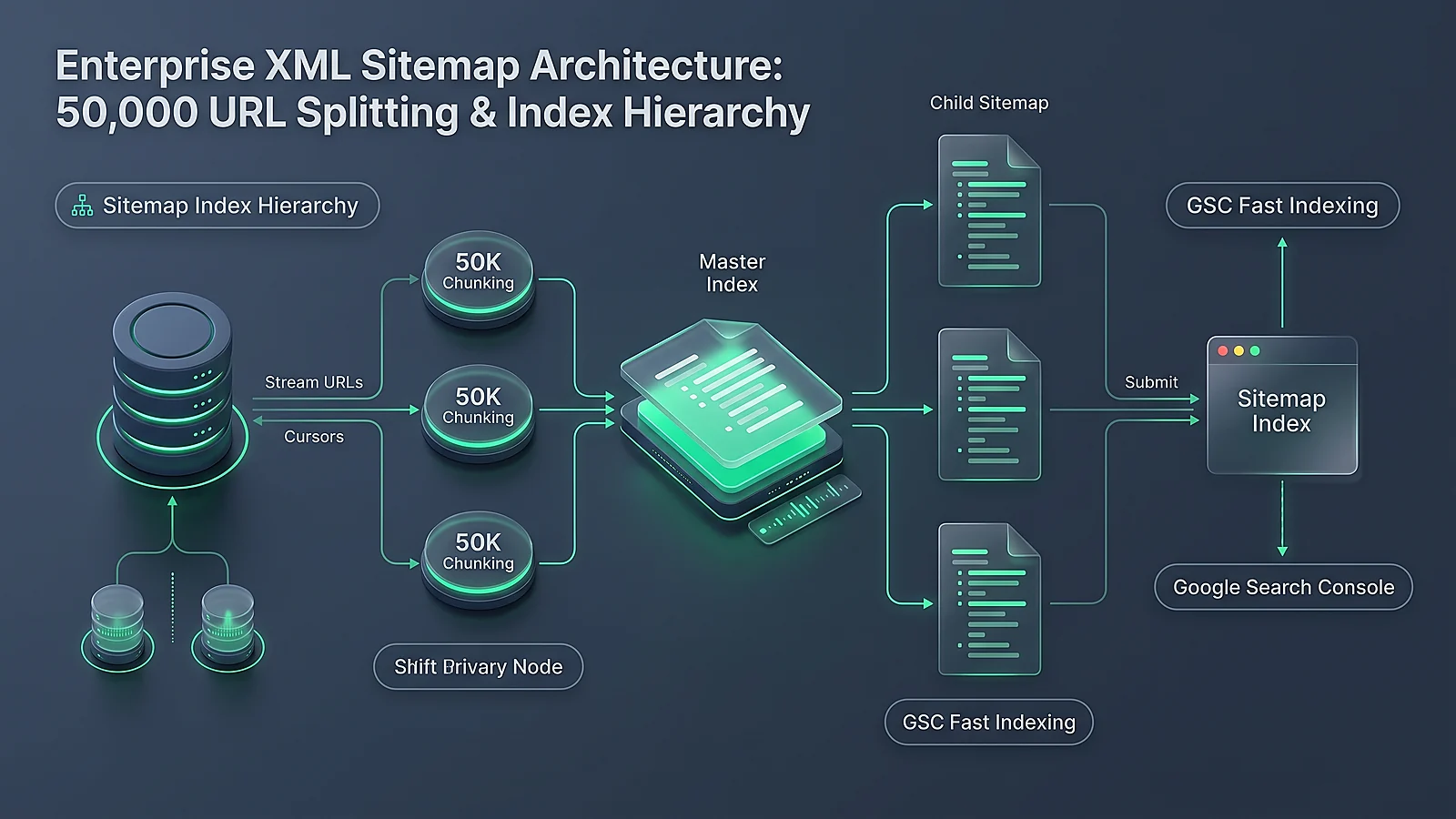
Chapter 10: Programmatic XML Sitemap Generation, Validation & Splitting
For enterprise e-commerce portals and content publishers with hundreds of thousands of dynamic pages, relying on monolithic CMS plugins to generate XML sitemaps leads to fatal server timeouts and memory crashes. Writing a custom Python sitemap pipeline ensures strict adherence to the Google Sitemaps XML protocol (maximum 50,000 URLs or 50MB uncompressed per sitemap file) with automated gzip compression.
1. High-Speed Streaming XML Sitemap Generator
Using Python's xml.etree.ElementTree alongside gzip, you can stream millions of database records directly into indexed sitemap chunks without loading entire datasets into RAM:
import gzip
import xml.etree.ElementTree as ET

def generate_sitemap_chunk(url_records, output_filename):
    urlset = ET.Element("urlset", xmlns="http://www.sitemaps.org/schemas/sitemap/0.9")

    for item in url_records:
        url_el = ET.SubElement(urlset, "url")
        loc = ET.SubElement(url_el, "loc")
        loc.text = item['loc']
        lastmod = ET.SubElement(url_el, "lastmod")
        lastmod.text = item['lastmod']
        changefreq = ET.SubElement(url_el, "changefreq")
        changefreq.text = item.get('changefreq', 'weekly')

    raw_xml = ET.tostring(urlset, encoding='utf-8', xml_declaration=True)
    with gzip.open(output_filename, 'wb') as f:
        f.write(raw_xml)

    print(f"Compressed Sitemap Generated: {output_filename}")

# Example execution with sample payload
sample_urls = [
    {"loc": "https://example.com/blog/python-seo", "lastmod": "2026-09-11", "changefreq": "daily"},
    {"loc": "https://example.com/pricing", "lastmod": "2026-09-10", "changefreq": "monthly"}
]
generate_sitemap_chunk(sample_urls, "sitemap_sample.xml.gz")
Chapter 11: Production Deployment, Cron Scheduling & Security Hardening
Deploying SEO automation scripts into a corporate production infrastructure requires adhering to strict software engineering standards. Running unauthenticated scrapers on shared developer laptops exposes proprietary data and risks IP bans.
API Credential Security Standard:
Never hardcode Google Cloud service account keys, database passwords, or proxy credentials inside Python scripts. Always inject credentials through environment variables (os.environ) or encrypted secret managers (AWS Secrets Manager, Google Secret Manager, or HashiCorp Vault).
1. Automated Cron Scheduling Architecture
Standard enterprise architectures separate routine operational tasks into tiered execution schedules:
- Hourly Cron Tasks: Real-time HTTP 500 error monitoring on transactional checkout URLs and core revenue landing pages.
- Daily 02:00 UTC Pipelines: Bulk Google Search Console API ingestion and BigQuery partitioning.
- Weekly Deep Crawls: Complete asynchronous website graph generation, internal PageRank calculation, and orphan page reporting.
- Monthly Model Refresh: Retraining semantic embedding vector models and running SERP entity gap analysis against top 3 competitors.


Ratings & reviews
No reviews yet. Be the first.